
The best travel planning app for social media users in 2026 is Plotline. It's the only app built specifically for the TikTok-to-trip workflow. Share a video from any app, and every place mentioned gets extracted and pinned on your map automatically. We tested Plotline, Rhyme, Wanderlog, and Google Maps side-by-side. Here's what we found.
A lot of people start with a chatbot instead. Here is the honest split on what ChatGPT can and cannot plan.
More than 40,000 travelers have used Plotline to map over 3 million places from 800,000+ social media posts.
Nobody starts planning a trip with a guidebook anymore. They start with a TikTok of someone slurping noodles at a hole-in-the-wall in Bangkok, or an Instagram Reel walking through a hidden courtyard in Lisbon. The way we discover places has completely changed, but most travel planning apps haven't caught up. They still expect you to open a search bar, type in a place name, and add it manually. That disconnect is why your saved folder is overflowing and your actual trip list is empty.
We spent the last month testing every travel planning app that claims to work with social media content. We shared the same TikToks, pasted the same Instagram links, and tried to build the same trip across all of them. Here's what we found.
Our pick: Plotline, the only app purpose-built for the social-media-to-trip workflow. Share a TikTok, Instagram Reel, or YouTube video directly from any app and every place mentioned lands on your map automatically. No copying links, no manual searching.
At a Glance
| Feature | Plotline | Rhyme | Wanderlog | Google Maps |
|---|---|---|---|---|
| Save from TikTok/IG | Share sheet | Share sheet | Share or paste a link | No |
| Auto extraction | Yes | Inconsistent | New; missed 2 of 12 in our test | No |
| Multi-place per post | Yes | Yes | Yes | N/A |
| Map view | Map-first | Secondary | Secondary | Secondary |
| Itinerary generation | Auto, 1st trip free | Unreliable | Manual or from an import | No |
| Pricing | Generous free tier | Extremely limited free tier | Free tier available | Free tier available |
| Platforms | iOS | iOS | iOS, Android, Web | iOS, Android, Web |
| Verdict | Best overall | Promising but rough | Best for Android and web | Best for navigation |
Keep reading for detailed reviews of each app, or download our pick now.
What Makes a Good Social Media Travel App?
Not every travel app needs to handle social media. But if you're someone who discovers 90% of your travel ideas while scrolling, the app you use needs to meet a specific set of criteria. Here's what we evaluated:
- Social media import: Can you actually save from TikTok, Instagram, and YouTube? How frictionless is the process?
- Automatic place extraction: Does the app figure out what places are mentioned in the content, or do you still have to search manually?
- Multi-place handling: A single "Top 8 Restaurants in Rome" video contains eight places. Can the app extract all of them?
- Map view: Can you see all your saved places geographically? This is essential for understanding what's near what when you start planning.
- Itinerary generation: Can the app help you go from a scattered collection of pins to an actual day-by-day plan?
With those criteria, let's look at the options.
The Apps We Tested
Plotline
Plotline was built specifically for people whose travel inspiration lives on social media. The core interaction is dead simple: you're scrolling TikTok or Instagram, you see a place you want to visit, you hit Share and tap Plotline. That's it. The app processes the content (video, caption, images, metadata), and extracts every place mentioned. Each place gets geocoded, categorized, and dropped as a pin on your personal travel map.
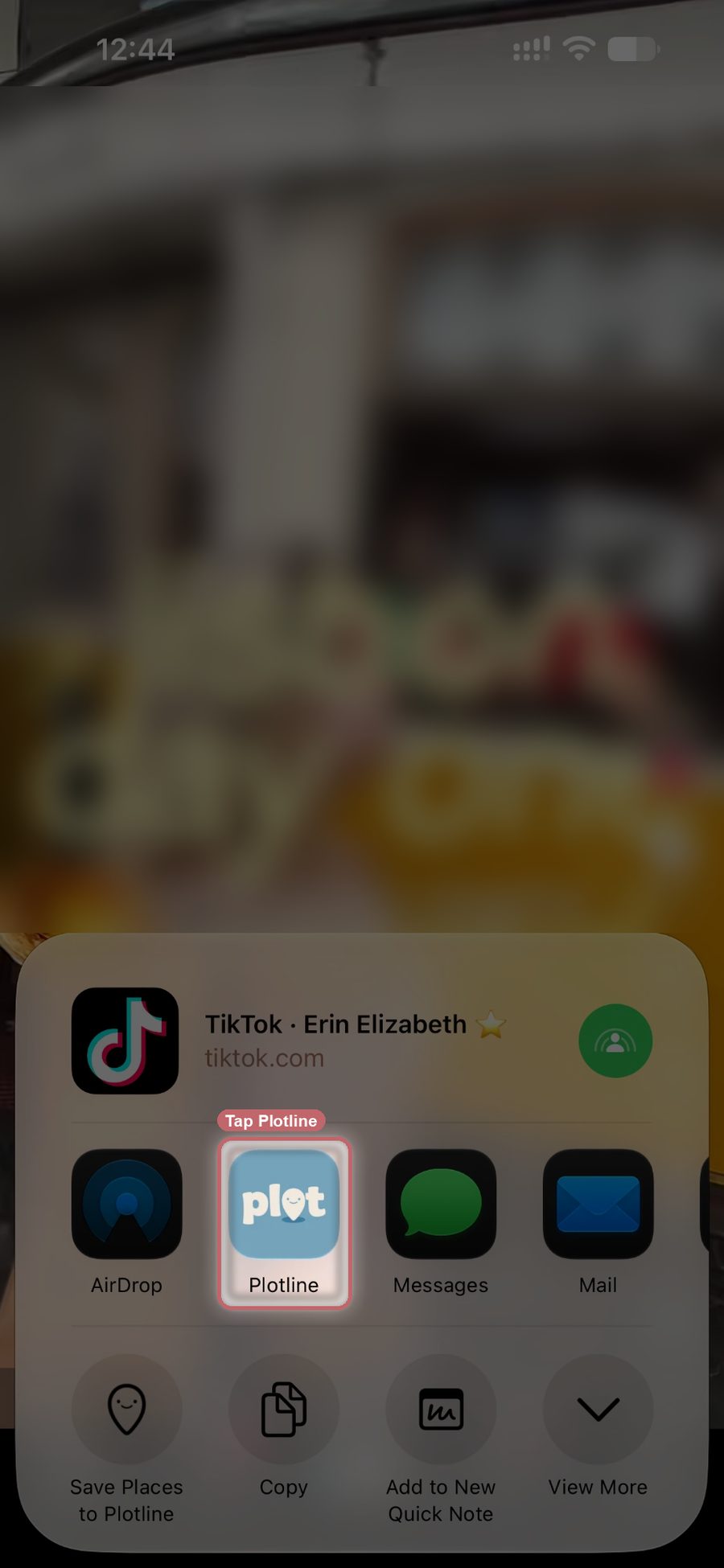
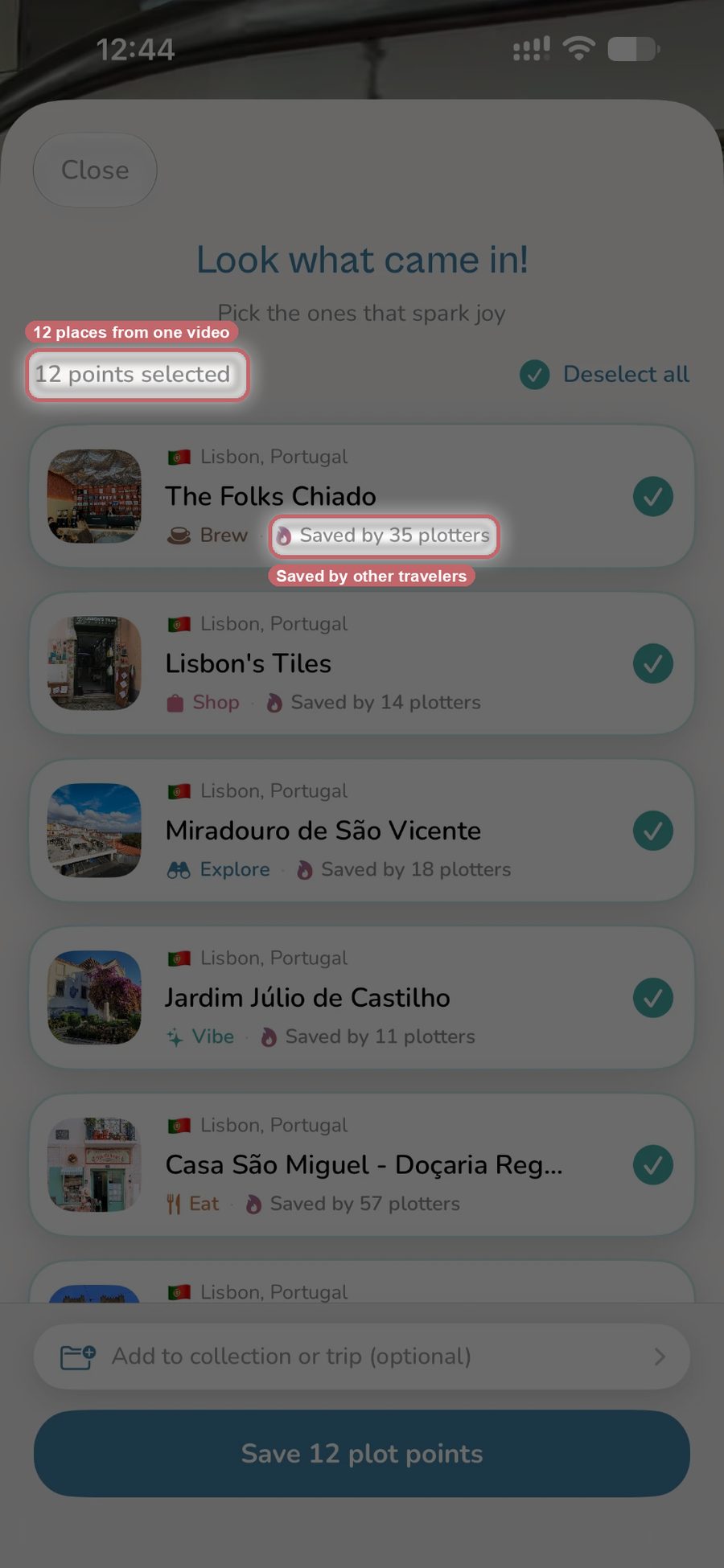
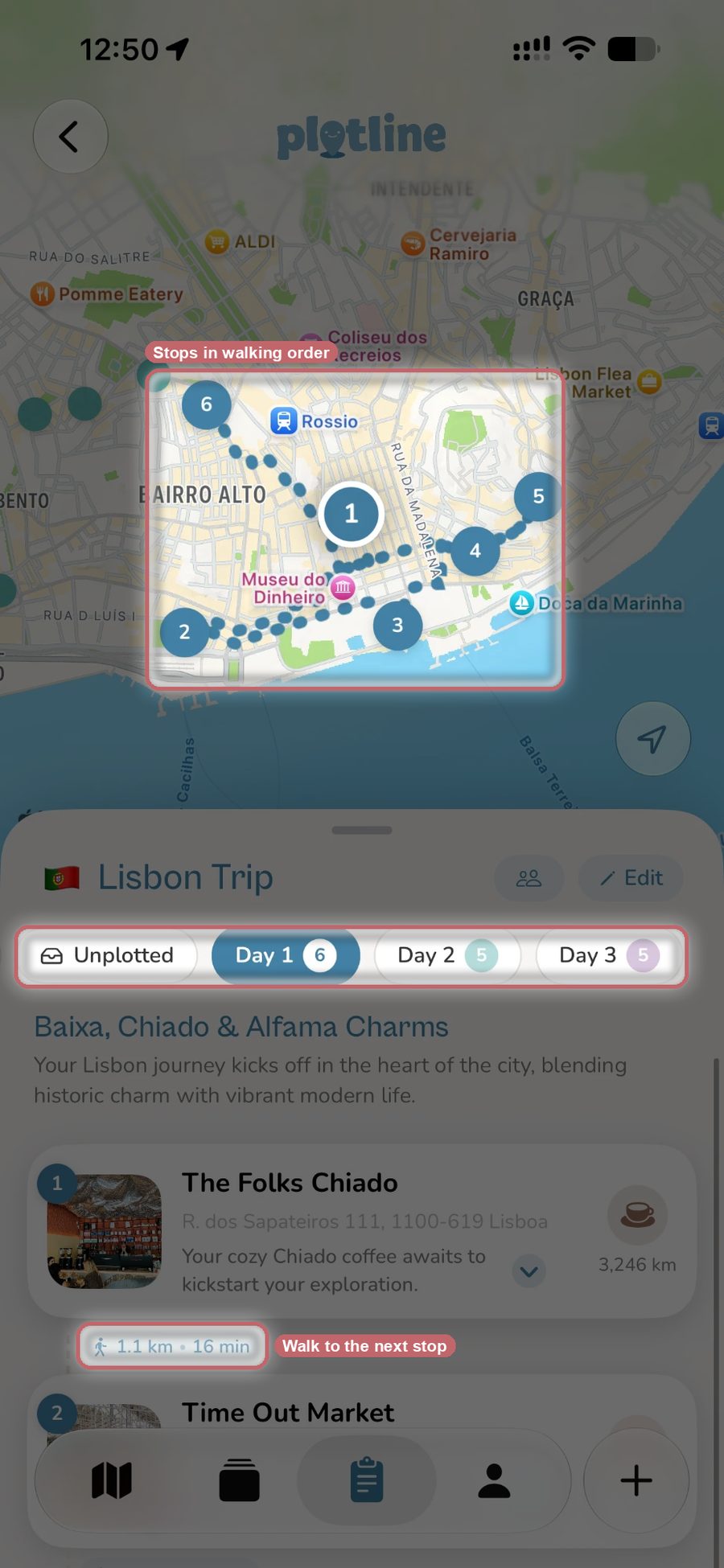
The good: The share sheet integration is the fastest capture flow of any app we tested. You never leave TikTok or Instagram. A single "12 Best Cafes in Tokyo" video creates twelve individual pins, each with its own location, category, and description pulled from the content. Collections let you organize places by destination or theme without the overhead of creating a full trip plan, perfect for the "save now, plan later" mindset. Search reaches your own notes too, so a place you saved weeks ago turns up even if all you remember is a fragment of what you wrote about it. The map-first design means you always have a visual sense of where your saved places are relative to each other. Plotline also turns those saved places into a day-by-day itinerary: pick a destination and dates, set a pace (Chill, Balanced, or Packed) and a few vibes, and it builds a route-optimized plan from your saved places plus AI recommendations, anchored to a home base like your hotel so each day routes outward from where you're staying. Must-see places can be locked in, Side Quests handles a spontaneous single day, and friends can join a trip as editors or viewers and watch it update live.
The catch: iOS only at this point. There's no budget tracking, flight booking, or confirmation-email import, so frequent bookers will want a companion tool for that side of the trip. But for the specific job of capturing and organizing social media travel inspiration, nothing else comes close.
Rhyme
Rhyme is the closest competitor to Plotline in the social-media-first space. The concept is similar: share a link from Instagram or TikTok via the share sheet and the app tries to extract place information from the content. It's positioned as a social travel planning tool with a feed-like interface.
The good: Rhyme clearly understands the problem. Share sheet integration works, and when extraction succeeds, it surfaces useful place information. It can extract multiple places from a single post. The app has a clean, modern design and the team is iterating quickly.
The catch: Extraction has been uneven across our tests. Some videos extracted perfectly and others missed key places or pulled incorrect locations. The map feels like a secondary feature rather than the core experience, you spend more time in a feed view. The itinerary generation is unreliable, often recommending out-of-the-way places that don't make geographic sense for your trip. The free tier is extremely limited, making it hard to build up a meaningful collection without paying. iOS only.
Wanderlog
Wanderlog is one of the most fully-featured trip planning apps available. It excels at the logistics: you can build detailed day-by-day itineraries, track budgets, save hotel and flight information, invite travel companions, and use a web clipper to save places from blogs and articles. The interface is polished and the planning tools are genuinely excellent.
The good: If you already know where you're going and want the logistics in one place, Wanderlog covers a lot of ground. The day planner with map integration is well designed, the budgeting tools are useful, and it runs on Android and the web as well as iPhone. The web clipper works well for blog-style content.
The catch: Social import is brand new and not reliable yet. Wanderlog added import from pasted links in September 2026 and from shared videos in October, and when we shared our 12-place Lisbon TikTok it missed 2 of the places. Everything it imports goes into a trip, which doesn't fit the casual "collect as you scroll" behavior that most people want. It's a trip planner first, not an inspiration catcher, and those are different tools for different stages of the journey.
Google Maps Saved Lists
Google Maps is already on your phone and its saved lists feature lets you bookmark any place and organize it into custom lists. It's free, familiar, and the underlying map data is the best in the business.
The good: Zero friction if you're already browsing in Google Maps. Lists are shareable. The map experience is unrivaled for navigation and local discovery. You can access your saves across every device.
The catch: Google Maps has absolutely no social media integration. You cannot share a TikTok to Google Maps and have anything useful happen. Every place must be manually searched and saved. If someone mentions "that little blue cafe on the corner near the Pantheon" in a video, you're on your own figuring out what it's called. There's no itinerary generation, no trip organization beyond basic lists, and no way to bridge the gap between content discovery and place saving. For navigation it's essential, but for the social-media-to-trip pipeline it's a dead end.
Dream Trip
Dream Trip is a newer entrant that's attempting to bridge the social media gap. The app lets you import content from social platforms and tries to extract travel-related information to help you plan trips.
The good: The team clearly sees the same problem, that social media is where travel inspiration starts and most apps ignore it. The ambition is there and they're actively developing the product.
The catch: In our testing, the extraction was less reliable and the overall experience felt less polished than more established options. Place identification was sometimes vague (a city rather than a specific restaurant), and the planning features are still early-stage. Worth keeping an eye on, but not yet ready to be your primary tool.
Our Verdict
The best travel planning app depends on what stage of the journey you're in, and where your travel ideas come from in the first place.
For the social-media-first traveler, Plotline is the clear winner. No other app closes the gap between seeing a place on TikTok and having it pinned on your map in fewer steps. The share sheet integration means zero context switching. The automatic extraction means zero manual work. And the map-first design means you can actually make sense of dozens of saved places across multiple cities at a glance. Plotline also turns those saved places into a day-by-day itinerary with optimized routes and AI-recommended stops, so the pipeline runs all the way from TikTok scroll to finished trip plan. It's the only app that treats social media content as a first-class input rather than an afterthought.
For bookings and budgets, or for planning on Android or the web, Wanderlog. If you and three friends are going to Portugal and need to coordinate hotels, budgets, and a shared day-by-day plan from a laptop, Wanderlog handles all of it in one place, and its brand-new import can pull places from a link or a shared video, though it missed places in our test. If your group's places already live in a Plotline collection, invite them as editors instead and the itinerary updates for everyone live.
For navigation and local search, Google Maps. Nothing beats it for getting around once you're there. But it's not a planning tool and it doesn't pretend to be.
The travel planning space is finally starting to acknowledge that discovery happens on social media. But most apps are retrofitting social features onto traditional planning tools. Plotline is the first one we've tested that was designed around the social-media workflow from the start, and that difference shows in every interaction.
Ready to Turn Your Saves Into Trips?
You've been saving TikToks and Reels for months. Some of those places are genuinely incredible. The only question is whether they'll stay buried in your saved folder or actually make it onto a map. The right tool makes the difference.
Related Posts
- Best App to Save Travel Inspiration in 2026
- Best Wanderlog Alternatives for Social Media Travelers
- How to Plan a Trip From Your TikTok and Instagram Saves
Frequently Asked Questions
What is the best travel planning app for saving places from TikTok and Instagram?
Plotline is built for that workflow specifically. Share a TikTok or Instagram Reel from the share sheet and it extracts every place mentioned, geocodes them, and pins them to your map automatically. Rhyme attempts the same thing but extraction is inconsistent in testing, sometimes missing places or pulling the wrong location. Wanderlog added import from shared videos and pasted links in fall 2026, but it's brand new and missed 2 of the 12 places in our test. Google Maps still needs every place searched and saved by hand.
Can a travel app automatically build a day-by-day itinerary from my social media saves?
Plotline does. Pick a destination and dates, set a pace and a few vibes, and it builds a route-optimized itinerary from your saved places plus AI recommendations, anchored to a home base if you set one, with your first trip plan free. Wanderlog's brand-new import can start an itinerary from a pasted link or a shared video, and in our tests Rhyme's itinerary tool often suggested out-of-the-way stops that didn't make geographic sense.
Is Google Maps good for planning a trip from TikTok videos?
Not for that part of the process. Google Maps has no social media integration: you can't share a TikTok to it and have anything useful happen, so every place still has to be manually searched and saved. It works well for navigation and local search once you're there, and lists are shareable, but it doesn't generate itineraries or bridge the gap between watching a video and saving what's in it.
Which travel app is best for planning a group trip with friends?
It depends on what the group needs. Wanderlog is built for coordinating hotels, budgets, and a shared day-by-day plan, and it works on Android and the web as well as iPhone. If your group's places already live in a Plotline collection, you can invite friends as editors instead, and the itinerary updates live for everyone as stops get added.
What's the difference between Plotline and Rhyme for saving TikTok places?
Both use the iOS share sheet and can pull multiple places from one post. The difference shows up in reliability: Rhyme's extraction was inconsistent in testing, sometimes missing places or grabbing the wrong location, and its map is secondary to a feed view. Plotline's extraction was consistent across the same test videos, the map is the primary view, and it also builds a day-by-day itinerary from what you save.